 PiHead
 Download the app
The PiHead Tracker app is free. It finds the device, passes your head movement to the game and stores your settings. Everything it needs is included in the installer.
Installation
Takes a minute and doesn't require administrator rights.
- Download the installerClick the Download button above.
- Run the downloaded fileOpen PiHeadTracker-Setup-0.6.0.exe from your browser's downloads.
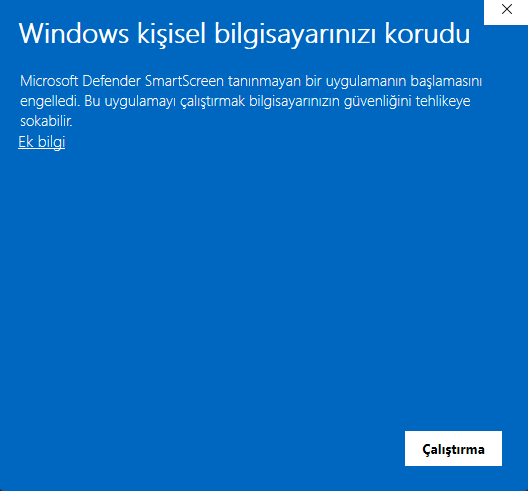
- If a blue warning appears, click More info, then Run anywayClick “More info” in the warning, then the “Run anyway” button that appears below.
- Continue with “Next”Optionally tick the desktop shortcut and “Start with Windows”.
- Plug in the deviceThe app finds the device by itself and opens the setup wizard the first time.
Why does this warning appear?
Windows shows the “Windows protected your PC” warning for apps downloaded from the internet that are still new. It is not a virus warning; it means Windows doesn't know the publisher yet. You can verify that the file comes from us with the SHA-256 value below.
System requirements
| Operating system | Windows 10 or Windows 11 (64-bit) |
| Connection | A free USB port (plugging directly into the computer is recommended) |
| Disk space | About 170 MB |
| Extra software | None (everything, including .NET, is in the installer) |
| Administrator rights | Not required |
Verify the file (optional)
To make sure the downloaded file has not been altered, run this command in PowerShell and compare the result with the value below:
Get-FileHash .\PiHeadTracker-Setup-0.6.0.exe204f04602eb6d49a79f898ac74a34089499b3fa9a5de51788ee283f9f5725802Release notes
What changed in each version. Longer write-ups are in the news.
0.6.0
October 1, 2026
- Sound feedback for recenter, pause and device connection
- Automatic recenter when a game connects
- Neck model (experimental): natural position movement while turning
- Status-colored tray icon and a notice when the device disconnects
- User guide inside the app (PDF, works offline) and settings reset
- English website and English user guide
0.5.0
October 1, 2026
- 3D live view: a headset-wearing head model turns with your head
- Auto recenter: accumulated drift fades out by itself (Off/Light/Medium/Strong)
- Joystick, HOTAS and wheel buttons for recenter and pause
- English interface (Dil · Language)
- Support for games that use the FreeTrack protocol
- Profile export and import
- Error log, safer settings saving and recent events in the support report
0.4.0
October 1, 2026
- Game profiles: separate sensitivity, smoothing and response curves per game
- The profile is selected automatically when a game starts and returns to Default when it closes
- Game exit is now always detected
0.3.2
October 1, 2026
- Support for new device firmware
- Stability improvements
0.3.1
October 1, 2026
- Safer package format for firmware updates
- Stability improvements during connection and updates
- Support Assistant text fixes
0.3.0
October 1, 2026
- Automatic updates: the app tells you about a new version and installs it in one click
- Device firmware updates from inside the app, in one click
- Genuine device verification
- Sensor fault notice and new Support Assistant checks
0.2.0
October 1, 2026
- Response curves: mouse-editable curve per axis, presets and live position display
- Support Assistant: live system check, step-by-step troubleshooter and support report
- System tray: keeps running when closed, starts with Windows
- Configurable shortcuts and pausing tracking
- Installer, new icon and app logo
- Other tracking programs' settings are always restored
0.1.0
September 30, 2026
- First release: automatic device detection, head tracking, recentering, smoothing
- Automatic mounting detection with the setup wizard
- TrackIR and FreeTrack compatible game output
- Automatic drift correction during use