 PiHead
 Look around by turning your head.
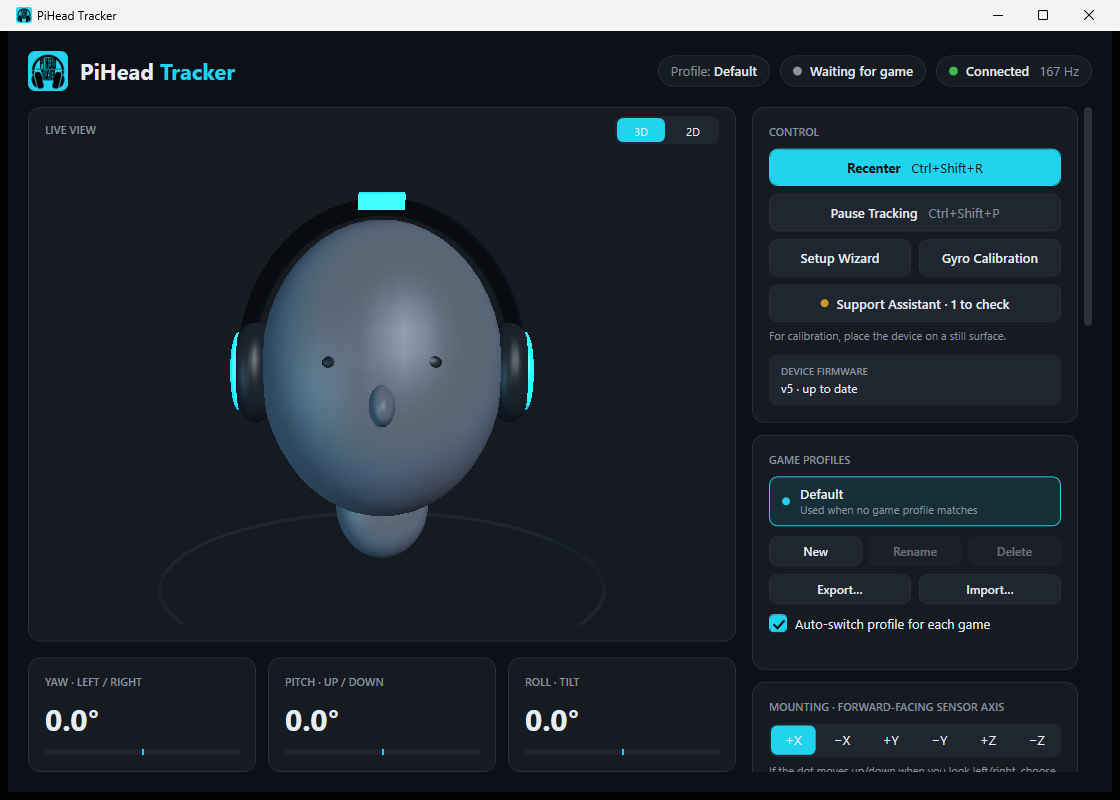
PiHead Tracker is a small head tracker that clips onto the headband of your headset. Turn your head to the right and the in-game camera turns right with it. No camera, no infrared lights and no drivers to install.
Set up in a few minutes
It doesn't matter which way you mount the device. On first start, a short setup wizard works out the orientation for you.
Clip it on
Place the device on the headband of your headset and connect the USB cable to your computer.
Run the wizard
The app finds the device. The wizard asks you to look straight at the screen and tilt your head forward once.
Enable it in your game
Turn on TrackIR or head tracking in the game's settings. The name of the connected game appears at the top of the app.
Features
The device measures how your head turns, and the free Windows app passes that movement to your game. All settings live in the app.
160 readings per second
The motion sensor samples rotation at a high rate, so the in-game view follows your head smoothly.
Not affected by lighting
There's no camera, so it works the same in a dark room, with glasses or with a cap.
Drift corrects itself
The app learns sensor drift while you use it. Auto recenter removes the small offset that builds up over long sessions.
Settings per game
Save sensitivity, smoothing and response curves for each game. The app picks the right profile when the game starts.
Recenter with a key or HOTAS
Recenter and pause can be assigned to a keyboard shortcut or to a joystick, HOTAS or wheel button.
Support from the people who build it
Your questions are answered by the team that develops the device, in English or Turkish.
Tune the movement to suit you
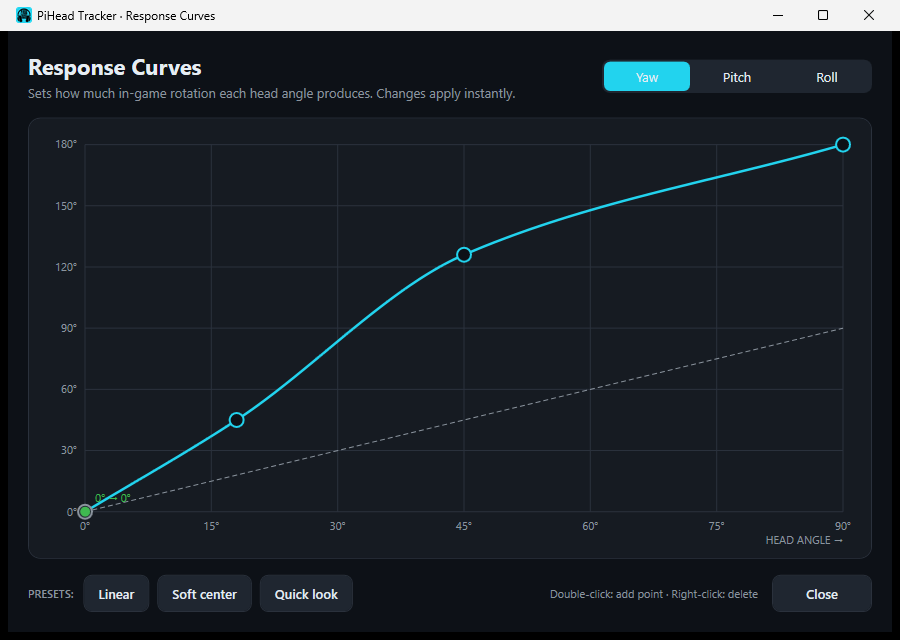
Response curves let you decide how each axis behaves. For example, you can soften small movements near the center and speed things up towards the edges, so you need to turn your head less to check a mirror.
Your current head position is shown live on the curve, and changes take effect in the game straight away.
- Presets: Linear, Soft center, Quick look
- Separate curve, sensitivity and invert for yaw, pitch and roll
- Export profiles to a file and use them on another computer
When something's wrong, it tells you why
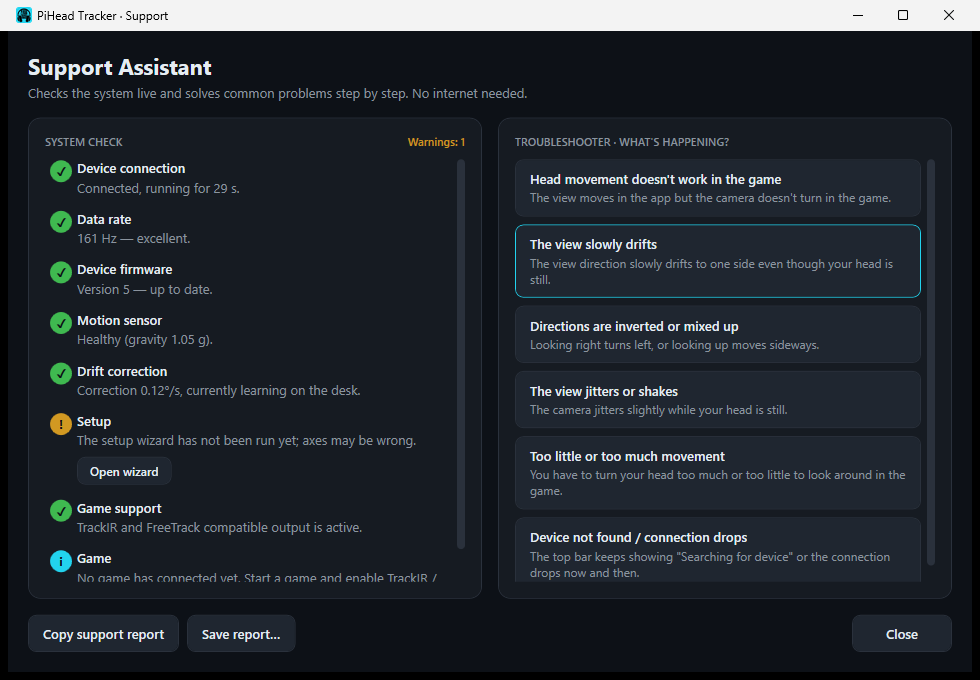
The Support Assistant keeps an eye on the connection, data rate, sensor and game. If the cable doesn't carry data, another program is using the device or the game hasn't connected, it says so clearly and shows the steps to fix it.
If that doesn't solve it, you can copy the support report and send it to us. The report is only shared when you send it.
Compatible games
Works in 90+ games that support head tracking through TrackIR or FreeTrack.
Specifications
PiHead Tracker tracks the rotation of your head. It doesn't measure positional movement such as leaning forward or sideways; that requires a camera-based system.
| Tracked axes | Yaw (left-right), pitch (up-down), roll (tilt) |
|---|---|
| Update rate | About 160 readings per second |
| Sensor | 6-axis motion sensor (gyroscope and accelerometer) |
| Connection | USB, no separate driver needed |
| Game compatibility | TrackIR and FreeTrack protocols |
| Operating system | Windows 10 and Windows 11, 64-bit |
| App | Free, English and Turkish, updates automatically |
| Mounting | On the headband of your headset, in any orientation |
Buying
We sell the device only through trusted sales platforms, which handle payment, shipping and returns. Sales currently take place in Türkiye.
Sales start soon
Write to us if you'd like to hear when sales start, or for international and bulk orders.
Common questions
All questions →Which headsets does it work with?
Most headsets with a headband. It doesn't matter which way the device faces on the headset; the setup wizard detects it.
How is it different from TrackIR or camera-based systems?
PiHead Tracker doesn't use a camera or infrared light; it measures movement with the sensor on your head. Lighting doesn't affect it and there's nothing extra on your desk. On the other hand, it only tracks rotation and doesn't measure leaning forward or sideways.
Is the app free?
Yes. The app and its updates are free.
Does the view drift over time?
Every gyroscope-based device develops a small offset over time. The app learns and corrects it while you play, and auto recenter removes what's left. You can always recenter with a single key. More in this article.
News
All news →Version 0.6: sound feedback and a built-in guideRelease
Sound feedback for recenter and pause, automatic recenter when a game starts, an experimental neck model and a PDF guide that opens offline.
Why head trackers drift, and how to reduce itGuide
Why the view of a gyroscope-based head tracker slowly moves to one side over time, and how PiHead Tracker corrects it.
Version 0.5: 3D view, auto recenter and HOTAS supportRelease
A live 3D head view, auto recenter that removes accumulated drift, joystick and HOTAS buttons, an English interface and FreeTrack support.